Anyone can build an AI agent this weekend.
Pick a framework, plug in a model, give it a few tools, and watch it do something clever on the first try. It feels like magic. You record a demo. You show a friend.
Then you try to use it for real work.
It loops. It burns through calls you didn't budget for. It tells you a file exists that doesn't. It fails on item 3 of 12 and takes the other 9 down with it. It tries to write outside the folder it was supposed to stay in.
That's not a model problem. That's a missing step.
The 7 steps are easy. Step 8 is where agents go to die.
This is the blueprint we use at Edge Agency when we build agent systems — the same 7 steps every tutorial teaches, plus the step they leave out.
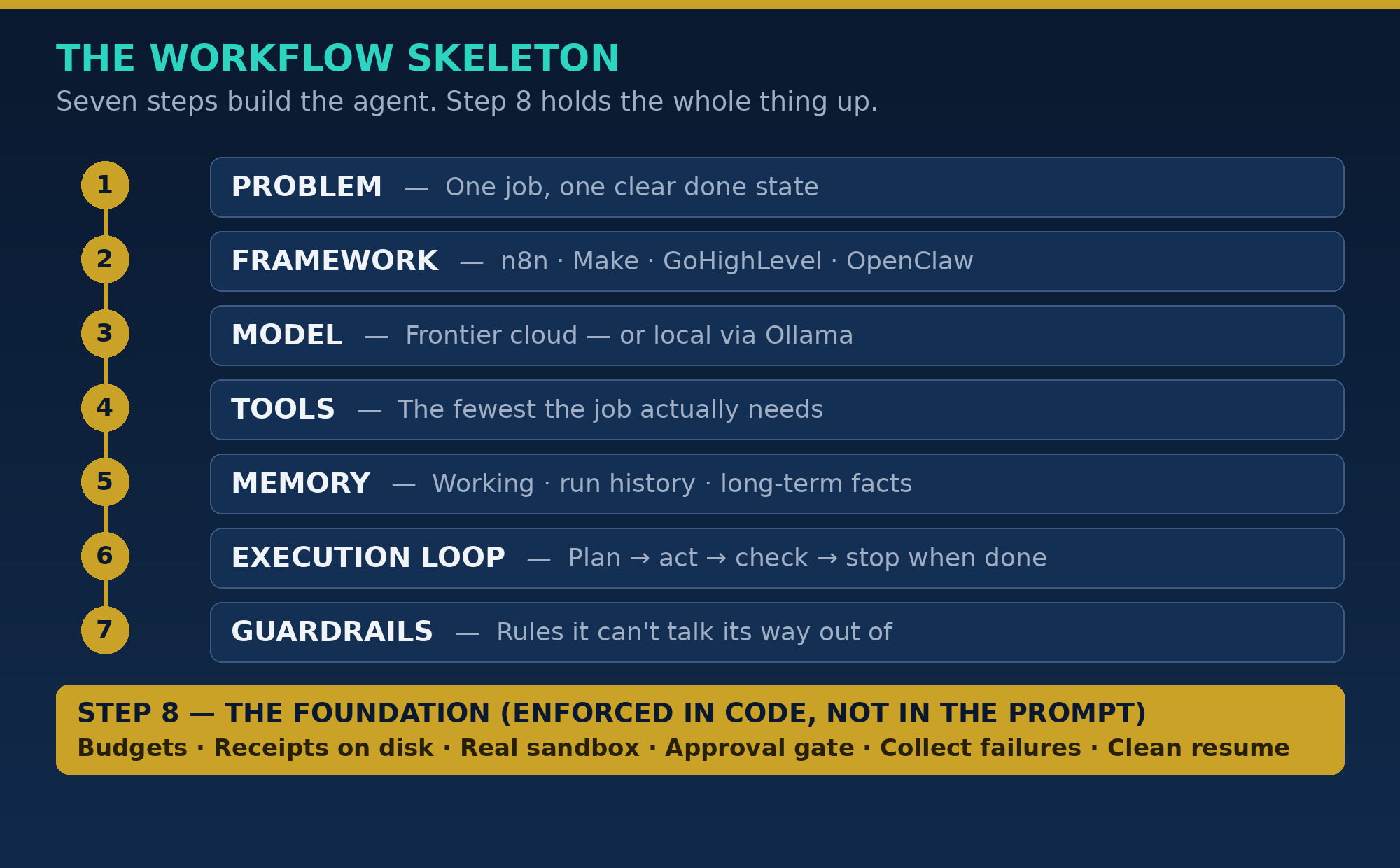
Step 1: Define one problem
Not "automate my business." Not "be my assistant."
One job, with a clear done state. Take this list of businesses and return a sheet with a verified email for each one. Take this inbox and draft replies, flagged by urgency.
If you can't say what finished looks like, the agent can't either. It will keep going, because nothing told it to stop.
Start narrow. An agent that does one job reliably is worth more than an agent that attempts ten jobs badly.
Step 2: Pick the framework that fits the job
The framework is the traffic system, not the engine.
For workflow automation — leads moving between apps, emails, CRMs, follow-ups — we live in n8n, Make, and GoHighLevel most days. They are built for that shape of work.
For agents that need to reason, delegate, and work on a desktop, we use agent frameworks like OpenClaw and our own orchestration layers.
Don't pick the framework because it's trending. Pick it because it matches the job, the tools you already pay for, and who has to maintain it after you.
Step 3: Choose the model — and don't default to the cloud for everything
Frontier models are excellent for planning, judgment, and messy language.
Local models via Ollama are excellent for the work that is repetitive, private, or high-volume: classification, extraction, first drafts, summarising your own files on your own machine.
The real question isn't "which model is smartest?" It's "which model is smart enough for this step, at a cost and privacy level I can live with — every day, not just in the demo?"
Good systems route. They don't use a race car to get groceries.
Step 4: Give it tools — the fewest it needs
Tools are how an agent touches the real world: search, read a file, write a file, call an API, send a draft to a queue.
Every tool is also a risk surface. Give an agent a tool it doesn't need for this job, and you've given it a new way to fail — or to do damage you have to clean up.
Start with the minimum set. Add a tool only when a real run proves it was missing.
Step 5: Give it memory that has a job
Memory is not "remember everything forever."
It's three different things, and tutorials blur them together:
- Working memory — what it's doing right now, in this run.
- Run history — what it already did, so it doesn't do it again.
- Long-term facts — the durable stuff: your rules, your contacts, your preferences.
If an agent can't tell the difference between those, it will either forget the job halfway through, or repeat finished work and charge you twice for it.
Step 6: Build the execution loop
The loop is simple to describe: plan → act → check the result → act again → stop when done.
Most failures live in two words in that sentence: check and stop.
An agent that acts without checking is just guessing quickly. An agent with no real stop condition will polish, retry, and wander long after the useful work is done.
Define the check. Define "done." Put both in the system, not in your hopes for the prompt.
Step 7: Add guardrails
Guardrails are the rules it can't talk its way out of:
- What it can never do
- What it must ask about first
- What counts as out of scope for this run
Write them plainly. "Do not send anything externally without approval" beats a paragraph of careful language the model can reinterpret under pressure.
And that brings us to the step the tutorials skip.
Step 8: Enforce it in code, not in the prompt
Everything above can live in a prompt. That's exactly the problem.
A prompt is a request. Production needs contracts — rules enforced by the system around the agent, whether the model feels like honouring them that day or not.
Here is how we enforce Step 8 in our own builds.
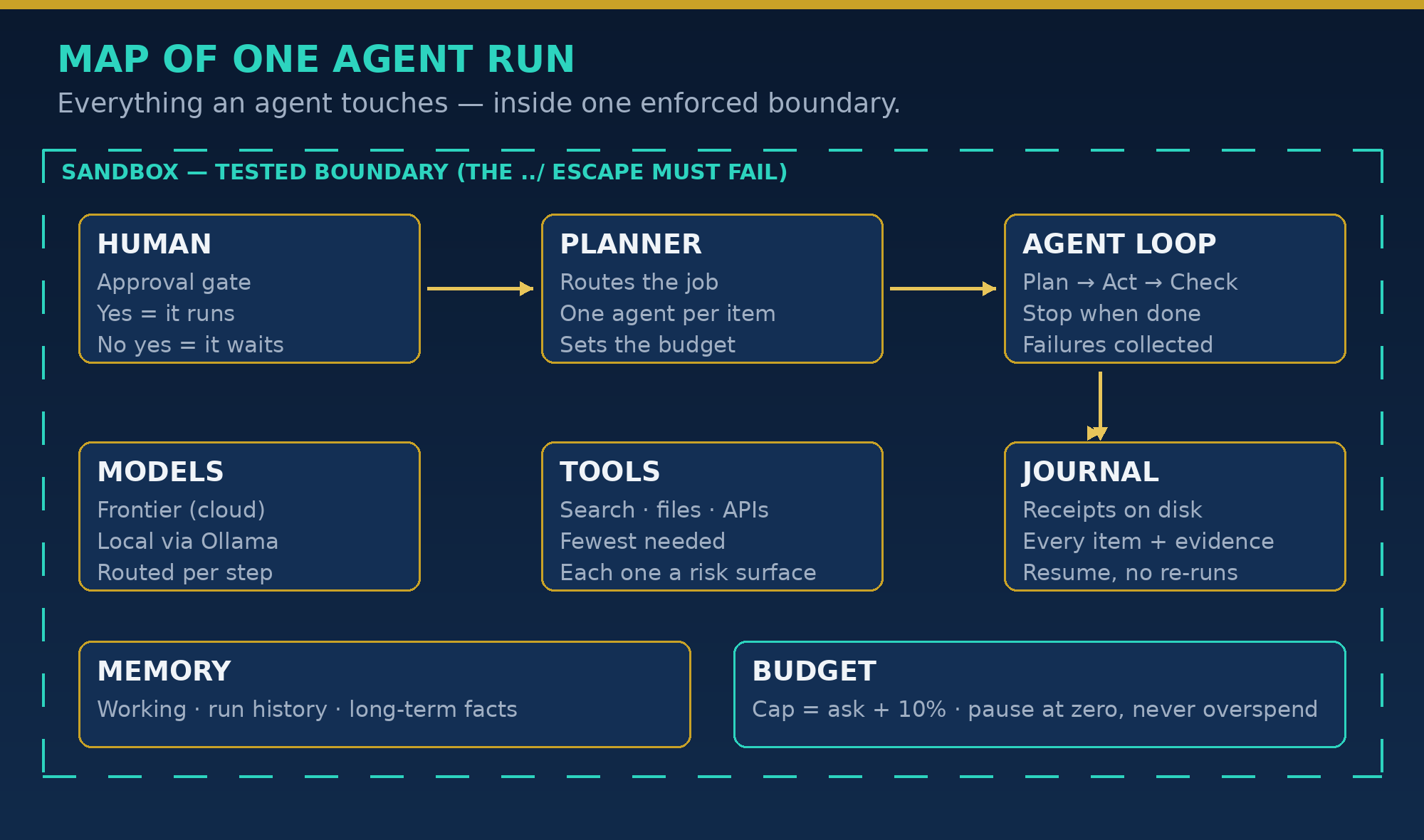
1. Budgets enforced in code
Every run gets a budget before it starts: how many agent calls, how much time on the clock.
In Robot Orchestra, our multi-agent desktop system, the cap isn't a suggestion in a prompt. The Runner enforces it. The effective cap is the ask + 10% — a little headroom, no blank cheque.
And when the budget runs out? The run pauses. It doesn't fail, and it doesn't quietly overspend. It stops, preserves everything it did, and waits for a human decision: raise the budget (which re-triggers approval, at the exact new total) or stop here.
If the budget only exists in the prompt, you don't have a budget. You have a wish.
2. Receipts on disk, not promises
Agents are confident. Confident and wrong is their worst mode.
So our rule is: an agent's claim is not the receipt. The artifact is.
A run keeps a journal on disk — every item, its status, its result, and the evidence for it. An agent can only claim it produced a file after the system verifies that path actually exists. A result that doesn't match the required structure — item, status, summary, evidence — is marked failed, not believed.
When something goes wrong at 2 a.m., you don't re-read a chat transcript and guess. You open the journal.
3. A sandbox that's actually a boundary
"Sandboxed" gets printed on a lot of systems where the sandbox is just… a folder name. A convention. Politeness.
We learned this the hard way in an earlier multi-agent build: an agent name containing ../ could create directories outside its sandbox. Nothing malicious — just a path that was never actually fenced. The lesson stuck.
So now the boundary test is explicit: the ../ escape must fail closed. Isolated runs get isolated, collision-free output paths. Shared mode is a deliberate choice, never an accident.
If you haven't tested the escape, you don't have a sandbox. You have a label.
4. The approval gate: a trigger, not a vault
Some actions should never be autonomous: sending, shipping, paying, deleting, contacting someone new.
Our gate works like this: nothing in that class executes without a human yes. Large plans gate too — in Robot Orchestra, a plan over 20 agent calls needs a fresh approval for that exact plan before it runs.
But understand the other half, because people get this wrong: approval is a trigger, not a vault. Once a human approves the exact thing, the system executes it — it doesn't just file the approval away and do nothing. The gate exists to get a real yes, not to stop work from ever happening.
No approval, no execution. Approved, it runs. Both halves matter.
5. Failure policy: collect, don't collapse
In real work, lists are messy. One address is dead. One page times out. One item is malformed.
A tutorial agent fails the whole run on the first bad item. A production system collects failures and delivers the rest: 11 of 12 items succeed, the run reports exactly which one failed, why, and with what error code — and you fix that one item instead of re-running eleven good ones.
Failure is information. Treat it that way, and a bad item costs you one item. Treat it as collapse, and it costs you the whole job.
6. Resume without re-doing finished work
Runs get interrupted. Machines sleep. Budgets pause. People take over mid-run to fix something by hand.
Resume has to mean resume — replay the journal, skip everything already done and verified, and pick up at the first unfinished item. No re-running finished work, no double-sends, no paying twice for the same result.
If your agent can't resume cleanly, every interruption is a restart. And restarts are where duplicates — and double emails to the same person — are born.
What this looks like in one real system
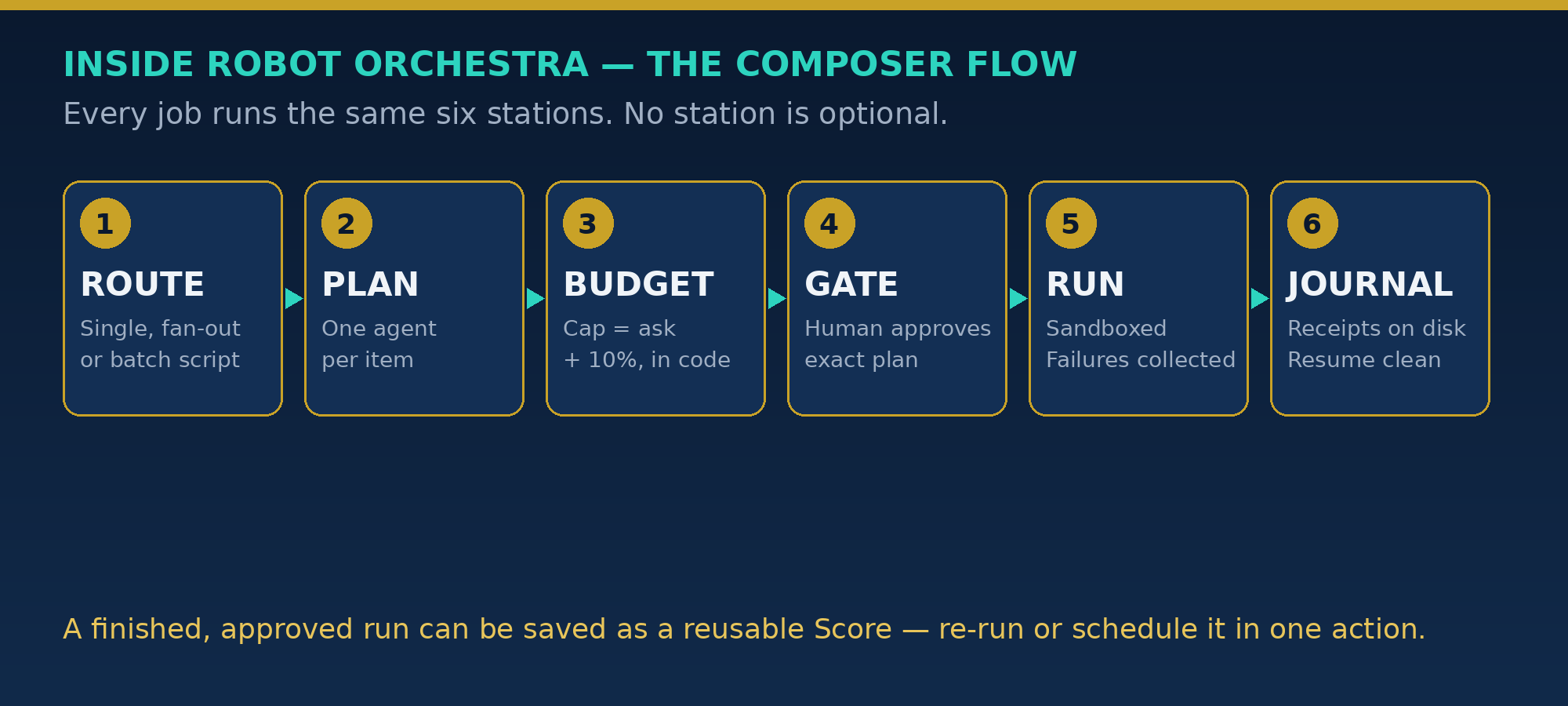
Robot Orchestra is the system we built these contracts into. Stripped to the flow, its Composer does this for every job:
Route → Plan → Budget → Gate → Run → Journal
- Route: One agent for a single job, fan-out when a job is a list (mandatory at 10+ items — one agent per item), or a plain batch script when the operation is identical and deterministic. Not everything deserves an agent.
- Plan: The job breaks into items, each with a short brief. The orchestrator orchestrates — it doesn't do the item work itself.
- Budget: The Runner sets the cap (ask + 10%) and the clock before anything starts.
- Gate: If the plan is big, or touches send / ship / pay / delete territory, a human approves the exact plan first.
- Run: Agents work in enforced sandboxes, in parallel where the route allows it. A human can pause or take over without corrupting the journal or the budget accounting.
- Journal: Every result lands in the run journal with its evidence. A finished, approved run can be saved as a reusable Score — a named job the engine can re-run in one action. (In the current app, Scores live in the engine; a Scores screen is planned for the V2 expansion.)
That's it. No magic layer. The Composer isn't smarter than the tutorials — it's just honest about where agents actually break, and it puts those rules in code.
The honest limits
This part matters, because this niche runs on screenshots and claims.
What's proven in our work: the Composer contracts above are built, the budget / pause / resume logic is tested headlessly, the sandbox escape test is part of the suite, and the failure-collection behaviour is how the system is designed to run day to day.
What's still being proven: the timed, real-model runs on a live Windows machine — the full speed and scale drills, done in the real app, not in a lab simulation. We have a bar for that (we call it the 3X Bar), and we don't print the number publicly until the drill receipts exist.
That's the differentiator we'd suggest for your builds too: say what's proven, say what's pending, and let the receipts close the gap.
Most agent content won't do that. That's exactly why doing it works.
Build the 7. Then build Step 8.
If you're on Step 1 today, good — start narrow, this weekend, with the steps above.
If your demo already works and dies in real use, you don't need a better prompt. You need Step 8: budgets in code, receipts on disk, a real boundary, a real gate, failures collected, and resume that respects finished work.
We talk about this stuff — real builds, real failures, real fixes — every day in Automation Legends, our free Facebook community for automation and agent builders.
👉 🔗 Join us in Automation Legends
Bring the step you're stuck on. Especially if it's Step 8.
— Digital Edge, Edge Agency — AI automation and business solutions: web design, funnels, AI frameworks and autonomous agents.